
I still remember the night I stayed up until 2 AM, toggling between two browser tabs one with a Shopify pricing page open and the other with a WordPress dashboard that had just thrown yet another plugin conflict error. I had a product ready, a small budget, and absolutely zero patience for confusion. The question eating at me was simple: which platform do I actually build my store on?
That was a few years ago. Since then, I have built and managed stores on both platforms for myself and for clients. I have made mistakes on both, celebrated wins on both, and spent real money figuring out what works and what does not. This article is everything I wish someone had told me before I picked a platform blindly.
Whether you are just starting out or you are seriously evaluating a switch, this honest breakdown of Shopify vs WooCommerce will help you make the right call without the usual corporate nonsense that makes every comparison article sound the same.
What Exactly Are These Two Platforms?
Before we get into the deep stuff, let me quickly set the stage for anyone who is newer to ecommerce.
Shopify – The All-in-One Hosted Solution
Shopify is a fully hosted ecommerce platform. You sign up, pay a monthly subscription, and Shopify handles everything the servers, the security, the updates, and the infrastructure. You do not need to touch a line of code if you do not want to. Your entire store lives inside Shopify’s ecosystem, and everything from checkout to inventory management is built in by default.
Think of it like renting a fully furnished apartment. You move in and everything works. You just decorate.
WooCommerce – The Open-Source Plugin for WordPress
WooCommerce is a free, open-source plugin that turns a WordPress website into an ecommerce store. Now, the word “free” here can be a little misleading more on that in the cost section but to answer a question I get asked constantly: is WooCommerce free? Yes, the core plugin itself is free to download and install. However, you will still need to pay for web hosting, a domain name, and likely some premium plugins or themes to get a professional store up and running.
Think of WooCommerce like buying a plot of land. The land might be cheap, but you still need to build the house, wire the electricity, and furnish it yourself.
Shopify vs WooCommerce – A Quick Side-by-Side Overview
Before we get into my personal war stories, here is a clean comparison table that covers the major factors at a glance. I will dig into each of these in detail throughout the article, but this gives you an instant snapshot.
| Feature | Shopify | WooCommerce |
| Hosting | Fully included | You arrange your own |
| Ease of Setup | Very easy, beginner-friendly | Moderate to steep learning curve |
| Cost to Start | From ~$39/month | From ~$10–15/month (but adds up) |
| Transaction Fees | 0.5–2% unless using Shopify Payments | None from WooCommerce itself |
| Customization | Limited without premium themes or code | Near unlimited via WordPress |
| SEO Control | Good, with some URL limitations | Excellent, full control |
| Security | Fully managed by Shopify | Your responsibility |
| Scalability | High, within their ecosystem | Very high, but needs maintenance |
| Support | 24/7 official support | Community-based, no dedicated support |
| Ownership | You depend on Shopify | You own everything |
This Shopify vs WooCommerce table is a starting point, not the full story. Let me walk you through what each row actually felt like in practice.
My Real Experience Setting Up Both Stores
This is the part I find most useful when reading any platform comparison not the feature lists, but what actually happened when someone sat down and tried to build something.
Setting Up Shopify – Faster Than I Expected
The first time I set up a Shopify store, I had a working, product-listed, payment-enabled store live in under four hours. That includes the time I spent second-guessing my theme choice and rewriting my homepage copy three times.
The onboarding flow is genuinely excellent. Shopify walks you through adding your first product, setting up a payment method, choosing a theme, and connecting a domain. It does not overwhelm you with settings you do not need yet. The default Dawn theme loads fast, looks clean, and requires zero coding knowledge to customize reasonably well.
The part that surprised me was how smoothly payment setup worked. I connected Shopify Payments (available in supported countries) in about five minutes no third-party gateway, no additional fees at that stage. For someone who has wrestled with payment gateways before, this felt almost too easy.
The only friction I hit early on was realizing that the free theme had limitations I could not work around without upgrading to a paid theme or hiring a developer. Some things you want to change like the exact layout of a product page section are locked unless you get into the Liquid code. That said, for most beginners, the defaults are more than acceptable.
Setting Up WooCommerce – Powerful, But Not Painless
Setting up my first WooCommerce store took closer to two full days and I already knew WordPress going in.
The process starts before you even install WooCommerce. You need to choose a hosting provider, set up WordPress, install the WooCommerce plugin, configure a theme that supports WooCommerce, and then go through WooCommerce’s own setup wizard. Each of these steps is manageable individually, but strung together they create a real barrier for someone who just wants to sell online quickly.
I made the mistake on my first store of choosing budget shared hosting to save money. The result was a store that loaded in over five seconds a death sentence for conversion rates and Google rankings. I eventually migrated to a better managed WordPress host (SiteGround and later WP Engine), which fixed the speed issue but added to my monthly costs.
Once you get past the setup phase, though, WooCommerce opens up in a way that Shopify simply does not. I have built product pages with completely custom layouts, integrated with obscure shipping APIs, and set up local pickup workflows that would have required expensive Shopify apps. The flexibility is real it just asks for your time and patience upfront.
Cost Breakdown – What I Actually Paid
This is where most comparison articles go wrong. They show you the headline pricing and nothing else. Let me show you what I actually spent.
Shopify Pricing – Transparent, But Costs Creep Up
Shopify’s plans are straightforward on paper. At the time of writing, the main tiers are Basic (~$39/month), Shopify (~$105/month), and Advanced (~$399/month). There is also a Starter plan for social selling and a Plus plan for enterprise.
The thing that surprises people is the transaction fee. If you do not use Shopify Payments either because it is not available in your country or you prefer a different gateway Shopify charges an additional fee on every transaction. On the Basic plan, that is 2%. On a store doing $10,000 a month in sales, that is an extra $200 disappearing every month before you have paid for a single ad.
Then come the apps. The Shopify App Store is excellent, but almost every meaningful app costs money. I have seen stores where the app stack alone costs $150–300 a month subscription recovery tools, review apps, upsell widgets, email marketing integrations. You can build a very capable store on Shopify, but budget realistically.
My monthly Shopify spend on a mid-size store was roughly: $105 (plan) + ~$120 (apps) + ~$15 (email) = around $240/month before advertising.
WooCommerce Pricing – Free Until It Is Not
In the WooCommerce vs Shopify cost conversation, WooCommerce often wins on paper. But let me show you what the real numbers looked like for me.
A realistic WooCommerce monthly cost breakdown:
| Item | Monthly Cost |
| Managed WordPress Hosting | $25–50 |
| Domain Name | ~$1.50 (annualized) |
| Premium Theme (annualized) | ~$5–10 |
| Security Plugin (e.g. Wordfence Pro) | ~$8 |
| Backup Plugin | ~$3–5 |
| Page Builder (if needed) | ~$8–12 |
| Email Marketing Tool | ~$15–30 |
| Total Estimate | $65–115/month |
So WooCommerce can genuinely be cheaper, especially at lower sales volumes. But the hidden cost people forget to account for is time. WooCommerce requires ongoing maintenance plugin updates, security patching, occasional troubleshooting. If your time has monetary value (and it does), factor that in.
Ease of Use – Who Should Pick What
If I had to give you one honest sentence: Shopify is for people who want to sell things, and WooCommerce is for people who want to build things that happen to sell things.
Shopify’s Interface – A Genuine Pleasure
Shopify’s admin dashboard is one of the best-designed backend interfaces I have used in any software category. Everything is where you expect it to be. Adding products is intuitive. Running a discount campaign takes minutes. The mobile app is actually useful for managing orders on the go.
For someone who is not technical who maybe has never logged into a server or installed a plugin in their life Shopify removes every obstacle between them and their first sale. That matters enormously.
WooCommerce – Power Comes With a Price
WooCommerce layered on top of WordPress is an incredibly powerful combination. But the WordPress admin was originally built for bloggers, not store owners, and that ancestry shows in places. Managing orders, setting up shipping zones, handling variable products with multiple attributes none of it is hard once you learn it, but the learning takes time.
This is exactly why when people ask me about the best ecommerce platforms for beginners, I almost always recommend Shopify first. The learning curve is shallower, the path to a first sale is shorter, and the cognitive load of managing a WooCommerce site especially when something breaks is something most new store owners are not ready for.
That said, if you have some WordPress experience, or if you are willing to invest time upfront, WooCommerce rewards that investment handsomely.
Design and Customization – My Honest Take
Shopify Themes – Beautiful, but Boxed In
Shopify’s theme library is genuinely impressive. The free themes are professionally designed and perform well. The paid themes in the Shopify Theme Store range from $150 to $400 and are typically worth the investment for a serious store.
The limitation I kept running into is what I call “theme ceiling” the point where you want to do something the theme simply does not support, and going beyond it means either hiring a Shopify developer who knows Liquid (Shopify’s templating language) or purchasing a different theme entirely. For most stores, this ceiling is high enough that it never becomes a problem. But if you have specific design requirements or want something truly unique, you will hit it.
WooCommerce – Unlimited, If You Can Handle It
With WooCommerce on WordPress, the design possibilities are genuinely vast. You can use page builders like Elementor or Bricks to construct product pages exactly the way you want them. You can modify every template file directly. You can install virtually any WordPress theme and make it work.
I will share a personal moment here: the first time I customized a WooCommerce product page from scratch using Elementor Pro, I felt a kind of creative satisfaction that I never got from adjusting a Shopify section. I built exactly what I had in my head. But I also once spent three hours troubleshooting a blank white screen caused by a theme update conflicting with a plugin something that simply cannot happen on Shopify’s managed environment. Both experiences are real.
SEO Capabilities – Which One Google Loves More?
This is probably the question I get asked most often, and it deserves a detailed answer.
Shopify SEO – Solid, With Some Limitations
Shopify gives you the essential SEO tools out of the box. You can edit meta titles and descriptions for every page, product, and collection. It automatically generates a sitemap and handles canonical tags. The platform also handles redirects reasonably well when you change URLs.
Where Shopify frustrates SEO professionals is in URL structure. Shopify forces products to sit under /products/ and blog posts under /blogs/blog/. You cannot change this. For most stores, this is irrelevant. But if you are in a competitive niche where URL cleanliness and site architecture matter, it can be a sticking point.
The Shopify blog is also functional but limited. It works for content marketing, but it does not have the flexibility or plugin support that a dedicated WordPress blog has.
WooCommerce SEO – Full Control, Full Responsibility
Running a WooCommerce store on WordPress gives you best-in-class SEO control. With a plugin like Rank Math or Yoast SEO, you can manage schema markup, control every meta element, implement breadcrumbs, edit URL slugs freely, and add structured data for product reviews, prices, and availability all of which Google’s rich results depend on.
My WooCommerce stores have consistently ranked faster for long-tail product keywords than equivalent Shopify stores in similar niches. I attribute most of that to the SEO flexibility and the blogging power of WordPress, which lets me build topical authority around my products more naturally.
That said, good SEO on WooCommerce requires that you actually set it up correctly which Shopify handles more automatically for beginners.
Payment Gateways, Apps, and Integrations
Shopify supports over 100 payment gateways, but it clearly prefers Shopify Payments. Use another gateway and you pay the transaction fee. For international sellers or those in markets where Shopify Payments is not available, this is a real cost that adds up.
WooCommerce integrates with virtually any payment gateway through free or low-cost plugins. Stripe, PayPal, Razorpay, PayU most providers have official WooCommerce plugins. There are no platform-level transaction fees from WooCommerce itself, which is a significant advantage for high-volume stores.
On the app and integration side, both platforms have extensive ecosystems. Shopify’s App Store is more curated and generally more polished, but you pay for that polish. WooCommerce’s plugin library through WordPress.org and premium marketplaces is enormous with options ranging from completely free to premium. For Indian sellers or sellers in emerging markets specifically, WooCommerce’s integration options are often broader and more localized.
Performance, Speed, and Security
Shopify – You Do Not Have to Think About It
One of the most underrated advantages of Shopify is that you simply do not manage servers. Shopify’s infrastructure is built for ecommerce at scale. Your store gets SSL automatically, Shopify’s CDN serves your assets globally, and during traffic spikes like a sale or a viral moment the platform handles it without you doing anything.
I have run flash sales on Shopify that drove hundreds of simultaneous visitors, and the store did not blink. That peace of mind is genuinely valuable.
WooCommerce – Your Store, Your Problem
WooCommerce performance is entirely dependent on your hosting and your optimization choices. On bad hosting, a WooCommerce store is painfully slow. On excellent managed WordPress hosting with proper caching and a CDN configured, WooCommerce can be blazingly fast sometimes faster than Shopify.
Security is also in your hands. I learned this the hard way when a client’s WooCommerce store got hit with a malware injection through an outdated plugin. The cleanup took an entire day and required a forensic scan of every file on the server. On Shopify, that scenario is essentially impossible because they manage the entire environment.
If you go the WooCommerce route, please invest in a security plugin, automated backups, and a managed hosting provider that monitors for malware. It is not optional.
Shopify vs WooCommerce – Who Should Use Which?
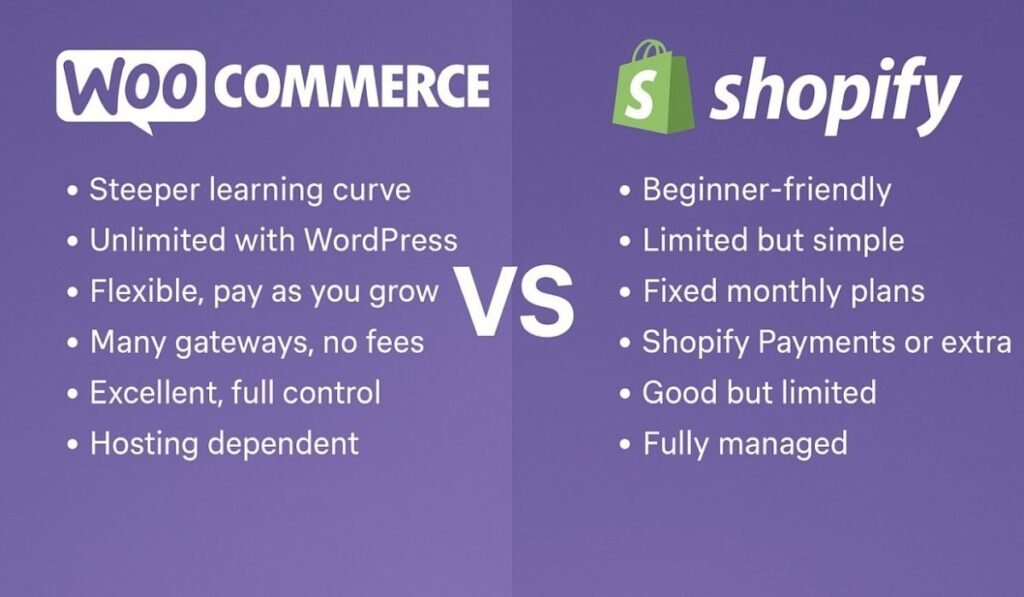
After all of this, here is the practical decision framework I use when someone asks me which platform to choose in the Shopify vs WooCommerce debate.
Choose Shopify If…
You are brand new to ecommerce and want to focus on marketing and products rather than technology. You want 24/7 support from a dedicated team. You are selling a relatively straightforward product catalog without highly specific customization needs. You value reliability and uptime above all else and do not want to worry about updates, security, or server performance. You are building a direct-to-consumer brand that needs to scale quickly.
Shopify genuinely excels as a platform for people who want to run a business, not manage a website.
Choose WooCommerce If…
You already have a WordPress website and want to add ecommerce functionality to it. You have specific customization requirements that Shopify’s theme system cannot accommodate. You are selling in a market where WooCommerce integrations are richer or more cost-effective. You want full data ownership and the freedom to move or modify your store without being locked into a platform. You are comfortable with some technical management, or you have access to a developer.
WooCommerce is the right choice for anyone who values flexibility and control over convenience.
What I Would Choose If I Were Starting Today
If I were starting my first ecommerce store from zero today, I would start on Shopify. Not because it is the objectively better platform, but because the time I would save in the first six months would be better spent on finding customers, testing products, and learning about my market. The store itself is not the product what you sell is.
However, if I were building a content-heavy brand where blogging, SEO, and organic traffic were central to the strategy, I would choose WooCommerce and WordPress without hesitation. The SEO ceiling on Shopify is real, and for long-term organic growth, the combination of WordPress and WooCommerce is genuinely superior.
In the WooCommerce vs Shopify choice, there is no universal winner. There is only the right fit for your specific situation, your technical comfort level, and your business goals.
Conclusion
Choosing between these two platforms is one of the most important early decisions you will make as an ecommerce store owner but it is not irreversible. Many successful brands start on Shopify and migrate to WooCommerce when they need more flexibility, and vice versa.
What matters most is that you start. Pick the platform that removes the most obstacles between you and your first sale, learn it deeply, and do not let the tech become an excuse to delay building.
If you found this honest comparison useful, think carefully about which of the two profiles in this article sounds more like you. The answer to the platform question is probably already sitting somewhere in your answer to that.
Frequently Asked Questions
Is WooCommerce free?
The WooCommerce plugin itself is free to download and install. However, you will need to pay for web hosting, a domain name, and usually some additional plugins or a premium theme to build a complete, professional store. Realistic starting costs range from $15 to $50 per month depending on your hosting choice and the tools you need.
Which is better for beginners – Shopify or WooCommerce?
For most beginners, Shopify is the easier starting point. It removes the need to manage hosting, handle security, and navigate the WordPress ecosystem. You can have a functional store live in a single day, which matters when you are still learning. WooCommerce is better for beginners who already have WordPress experience or are willing to invest time in setup.
Can I migrate from WooCommerce to Shopify later?
Yes, migration is possible using tools like Cart2Cart or by manually exporting and importing your product and customer data. It is not completely seamless you will need to rebuild your theme and reconfigure apps but it is very doable. Planning your URL structure and setting up proper 301 redirects is critical to preserving your SEO rankings during a migration.
Does Shopify charge transaction fees?
Shopify charges transaction fees (0.5% to 2% depending on your plan) if you use a third-party payment gateway instead of Shopify Payments. If you use Shopify Payments, there are no additional transaction fees beyond the standard credit card processing rates.
Which platform is better for SEO?
WooCommerce on WordPress offers more granular SEO control free URL structures, full schema markup options through plugins like Rank Math, superior blogging capabilities, and complete technical flexibility. Shopify handles the SEO basics well and is more than sufficient for most stores, but it has limitations around URL structure and content strategy that matter in competitive SEO environments.
Also Read About :- 17 Easy Ecommerce Business